
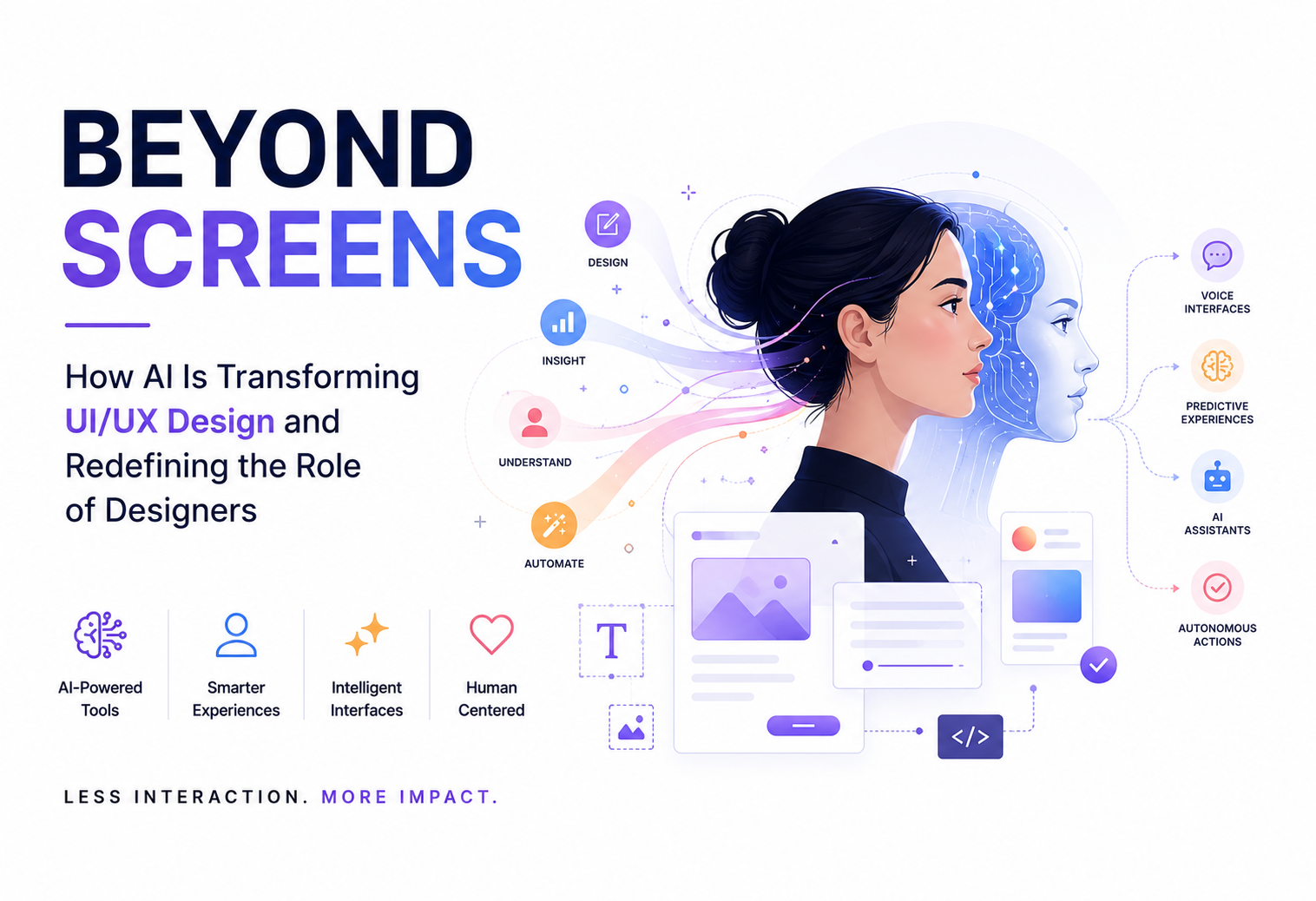
How AI Is Transforming UI/UX Design and Redefining the Role of Designers
For nearly three decades, the digital world revolved around screens. Every interaction required users to navigate interfaces, click buttons, fill forms, search for information, and manually move through workflows. As designers, our responsibility was clear: make those interactions faster, simpler, and more intuitive.
Today, we are witnessing one of the most significant shifts in the history of Human-Computer Interaction (HCI). Artificial Intelligence is changing not only how designers work, but also how users interact with technology.
The future is no longer centered around static interfaces. It is centered around intelligence.
Users are moving from interacting with screens to collaborating with systems that understand intent, predict needs, automate actions, and assist in decision-making. Concurrently, designers are shifting from drawing static frames to architecting intelligent experiences.
The Biggest Misconception About AI in Design
Whenever AI enters a creative industry, the immediate concern is always the same: “Will AI replace designers?”
The reality is far more nuanced. AI is not replacing designers; it is replacing repetitive execution.
Design has never been about moving pixels—it is about understanding human behavior.
- A generative tool can spit out a layout, but it cannot understand why a user abandons a checkout flow.
- A tool can draft a component library, but it cannot determine whether that system aligns with cross-functional business goals.
- A tool can generate hundreds of screen variations, but it lacks the contextual empathy to know which variation builds trust.
The future belongs to designers who leverage AI as a force multiplier rather than viewing it as competition.
How AI Is Changing the Daily Design Workflow
Historically, designers spent over 60% of their time on manual production—resizing layouts, naming layers, stitching wireframes, and managing variants. Modern software tools have shifted this paradigm from direct manipulation (drawing every frame manually) to intent-driven design (setting rules, parameters, and constraints while letting AI handle structural assembly).

5 Key Tools Redefining Product Creation
The modern product design stack is no longer just a collection of digital drawing boards; it has evolved into an interconnected suite of intelligent co-pilots. Today’s standout AI platforms target specific bottlenecks across the product lifecycle—from synthesizing user research and generating sitemaps to drafting high-fidelity UI components and translating design tokens into production code. By automating time-consuming layout mechanics and layer hygiene, these five key tools allow designers to skip the repetitive friction of early-stage production and jump straight into refining strategy, usability, and human experience.

1. Figma AI: Intelligent Design Governance
As the core workspace for product designers, Figma’s AI capabilities mark a shift from creation software to collaborative partner. Instead of staring at a blank canvas, designers can automatically organize messy layers, translate UI text into dozens of languages instantly, search assets using natural language, and generate contextually aware layout options—freeing up hours for high-level problem-solving.
2. Research Synthesis with Large Language Models
Synthesizing user research used to mean days spent reading raw transcripts, organizing stickies, and identifying patterns. By bringing LLMs like Claude or Uxia into research workflows, teams can quickly cluster user interview pain points, outline draft personas, and formulate targeted usability scripts.
3. Visual Assets via Adobe Firefly
Custom iconography, vector art, and UI visuals used to require tedious manual editing or endless searching through stock libraries. Generative tools like Adobe Firefly allow art directors to generate consistent, brand-aligned visual assets directly via prompts, shifting the designer’s role toward art direction and brand consistency.
4. Instant Wireframing with Relume and Galileo AI
Rather than spending days sketching standard dashboard layouts or landing page frameworks, platforms like Galileo AI and Relume interpret simple text descriptions to generate multi-screen UI flows aligned with design tokens. Design becomes a process of curating, blending, and refining pre-assembled structures.
5. Bridging the Code Gap with Vercel v0
The line between design files and live software is dissolving. Generative code tools like v0 turn conversational prompts into reactive components (built with React and Tailwind CSS). Rather than handing off static PNGs or mockups, designers can work directly with dynamic code interfaces.
Beyond Screens: Designing for Predictive & Agentic UX
The impact of AI extends far beyond internal workflows—it is changing the very nature of digital products. Historically, software was reactive: users learned systems and navigated menus manually. Increasingly, software is predictive and proactive.
1. AI Assistants as the Primary Layer
Instead of opening a CRM, a calendar, and a spreadsheet to compile a report, users are increasingly interacting with single, unified conversational layers. When the assistant becomes the primary interface, traditional navigation menus fade into the background.
2. Predictive User Experiences
Modern apps anticipate needs before input occurs:
- Spotify & Netflix tailor interface displays and recommendations dynamically based on usage habits.
- Grammarly predicts writing intent mid-sentence.
- Google Maps dynamically alters interface suggestions based on time of day and location context.
3. Agentic AI and Behavioral Design
The rise of autonomous AI agents means software no longer just displays information—it executes tasks across ecosystems. Designing for AI agents requires shifting from layout design to behavioral design: defining how an autonomous system communicates uncertainty, requests confirmation, avoids bias, and builds human trust.
The Core Competencies of the AI-Era Designer
As production execution becomes automated, human judgment becomes the high-value currency in product design.

To thrive in this environment, designers must focus on:
- Systems & Logic Thinking: Designing multi-state design systems, context-aware logic flows, and adaptive layouts rather than isolated, static screens.
- Algorithmic Curation: Reviewing dozens of AI-generated concepts and applying deep domain knowledge to pick the path that aligns best with user needs and business KPIs.
- Human-AI Interaction (HAI): Crafting transparent interfaces that show users why an AI made a recommendation, handling model fallbacks gracefully, and protecting accessibility standards (WCAG) and data privacy.
- Product Strategy & Empathy: Uncovering real human problems through qualitative observation and translating those needs into meaningful product capabilities.